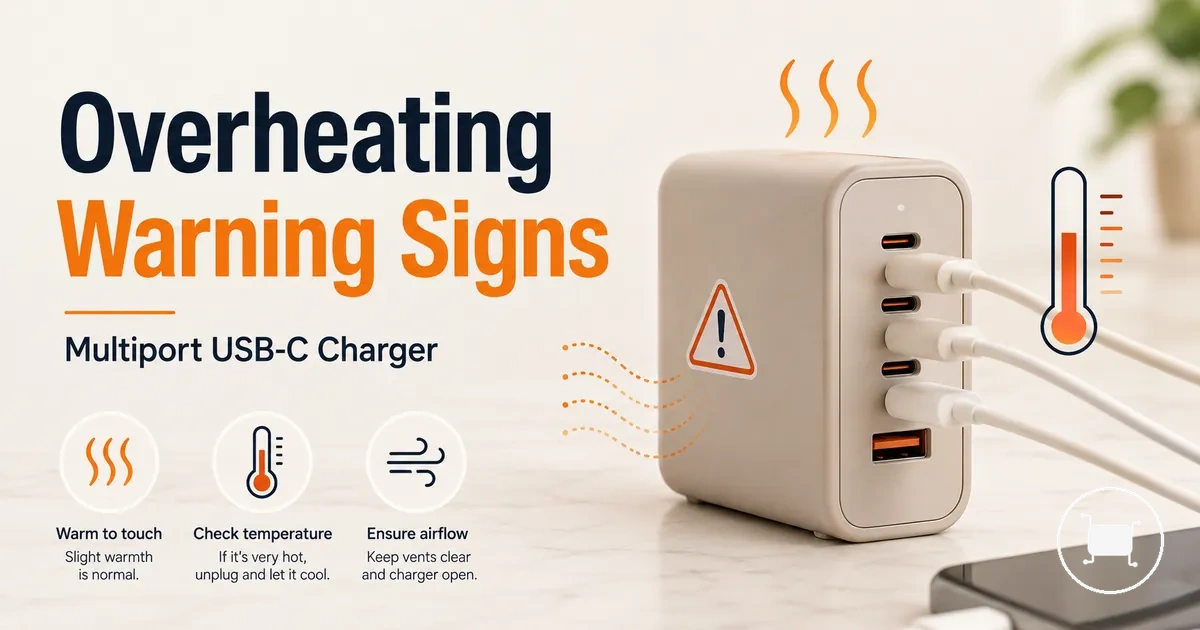
Multiport USB-C charger overheating causes and warning signs
A multiport USB-C charger can feel warm during high-output charging, especially when connected devices draw power at the same time. It becomes more concerning when the charger feels hot, smells unusual, changes shape, or changes charging behavior. That boundary separates normal warmth from overheating risk.
When a laptop, phone, tablet, or other device shares one charger, the charging load can move across the cable, port, charger body, and connected devices. The multiport USB-C charger hub gives the broader buying and use context before this page focuses on heat symptoms. Likely cause categories include high-output charging, cable or port resistance, poor ventilation, surface heat, ambient heat, and heat protection behavior.
Use warning signs to decide whether charger heat is only a use condition or a stop-use signal. The next section clarifies normal charger warmth versus unsafe overheating before moving into causes and safer checks.
Normal charger warmth vs unsafe overheating
Normal charger warmth is surface heat that can happen during fast charging or high-output use without other warning signs. Unsafe overheating is heat that becomes too hot to touch, repeats under similar use, or appears with smell, noise, discoloration, or changed charging behavior. Warmth alone is not automatically failure, but heat with damage or behavior changes increases risk.
Normal charger warmth vs unsafe overheating is easier to judge when touch comfort, charging load, and visible condition are separated from stop-use signals.
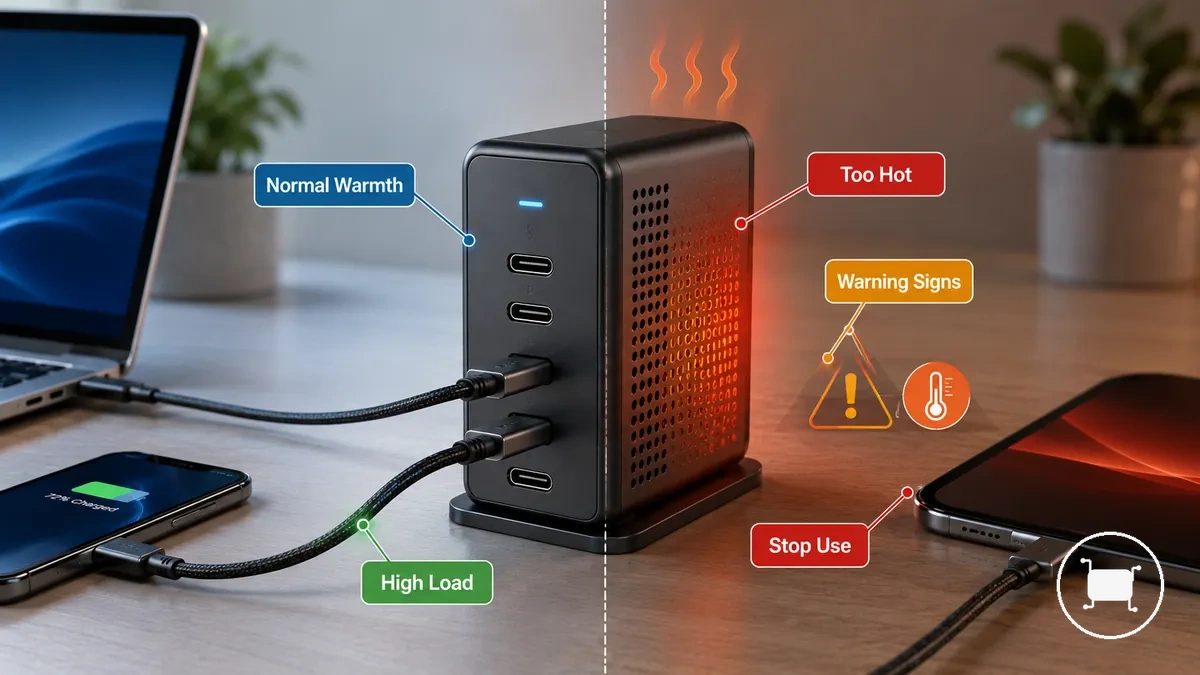
A charger may feel warm when the load is high, the charging session is long, or the surrounding surface limits heat release. The safer interpretation changes when heat is uncomfortable, repeated, or paired with warning signs such as smell, discoloration, unusual noise, or charging behavior changes.
| Heat condition | Typical signals | Safer interpretation |
|---|---|---|
| Normal warmth | Warm surface during fast charging or high-output use, with stable charging behavior | Monitor the charger and reduce load if warmth keeps building |
| Caution condition | Repeated heat, poor touch comfort, or warmth near a cable, connector, or port | Check load, cable fit, port condition, ventilation, and surface placement before reuse |
| Stop-use condition | Too hot to touch, smell, unusual noise, discoloration, deformation, or changed charging behavior | Stop using the charger and avoid treating cooldown as proof that the charger is safe to continue using |
Warm during fast charging or high output use
Warm during fast charging or high output use can be a normal result of higher charger output demand. As power draw increases, conversion loss and electrical resistance can create surface warmth on the charger body, cable connection points, or nearby port areas. The amount of surface warmth usually depends on the charging load.
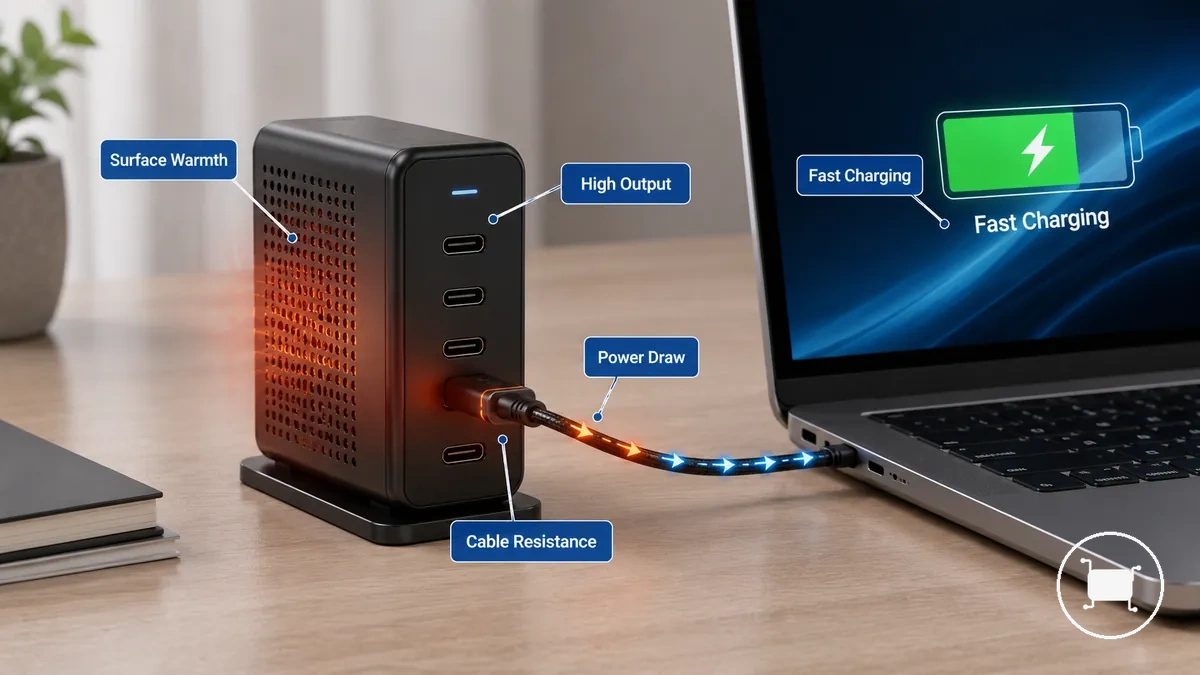
Warm during fast charging or high output use is often more noticeable when charging duration is longer or when ambient temperature is higher. Higher charger output demand can create more conversion loss, while resistance within a cable or connection can add heat, making adapter warmth easier to notice during sustained high-output use.
Too hot to touch or changing charger behavior
Too hot to touch or changing charger behavior is a warning condition that deserves attention. Repeated excessive heat can be more concerning when it appears alongside throttling, unplugging, or other changed charger behavior. Heat becomes more significant when the concern moves beyond discomfort and includes observable behavior changes.
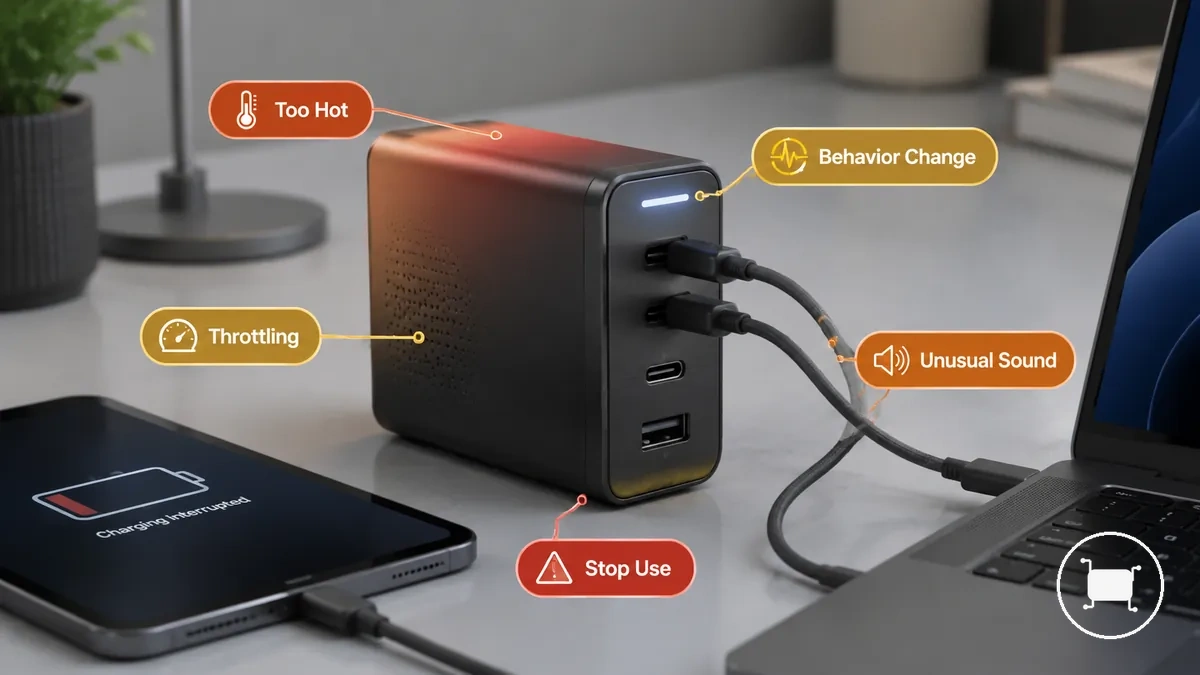
The checklist below separates subjective discomfort from warning behavior and focuses on signals that can be observed without repeated touch testing.
- Repeated heat that becomes too hot to touch during similar charging conditions
- Throttling that reduces charging performance or appears as a thermal response
- Unplugging behavior or charging interruption that occurs without user action
- Smell or unusual sound coming from the charger body during operation
- Casing changes such as deformation, separation, or visible material changes
If excessive heat appears together with one or more of these signals, the condition may indicate a stop-use signal rather than normal operation. Continued use is harder to justify when observable behavior changes or casing changes accompany the heat.
Why multiport USB-C chargers overheat under load
When a multiport USB-C charger appears to overheat under load, the cause is often a combination of charging load, resistance, and limited heat dissipation rather than a single fault. Multiple connected devices can increase power demand, while resistance in a cable, connector, or port can add localized heat. Heat buildup may become more noticeable when load rises, resistance increases, or ventilation is restricted.
The table below helps diagnose where heat appears and which conditions may be contributing to it. A charger body, port area, cable connection, or surrounding surface can each point toward a different diagnostic grouping.
| Cause pattern | Where heat appears | What to check | Safer interpretation |
|---|---|---|---|
| Multiple connected devices with high wattage allocation | Charger body | Charging load and power demand across connected devices | Higher load can increase overall heat buildup |
| Cable, connector, or port resistance | Cable end or port area | Cable condition, connector fit, and port condition | Localized heat may indicate resistance at the connection point |
| Limited ventilation and trapped heat | Charger body and nearby surface | Airflow, placement, and surrounding environment | Reduced heat dissipation can make operating heat more noticeable |
| Compact GaN design with high power density | Outer charger casing | Heat concentration during sustained charging load | Warmth may be concentrated in a smaller body size |
If heat appears mainly around a cable or port, resistance is often the first cause to examine. If the charger body becomes noticeably hotter while powering multiple connected devices, start by assessing charging load, wattage allocation, ventilation, and heat dissipation conditions.
High wattage, multiple devices, and power sharing demand
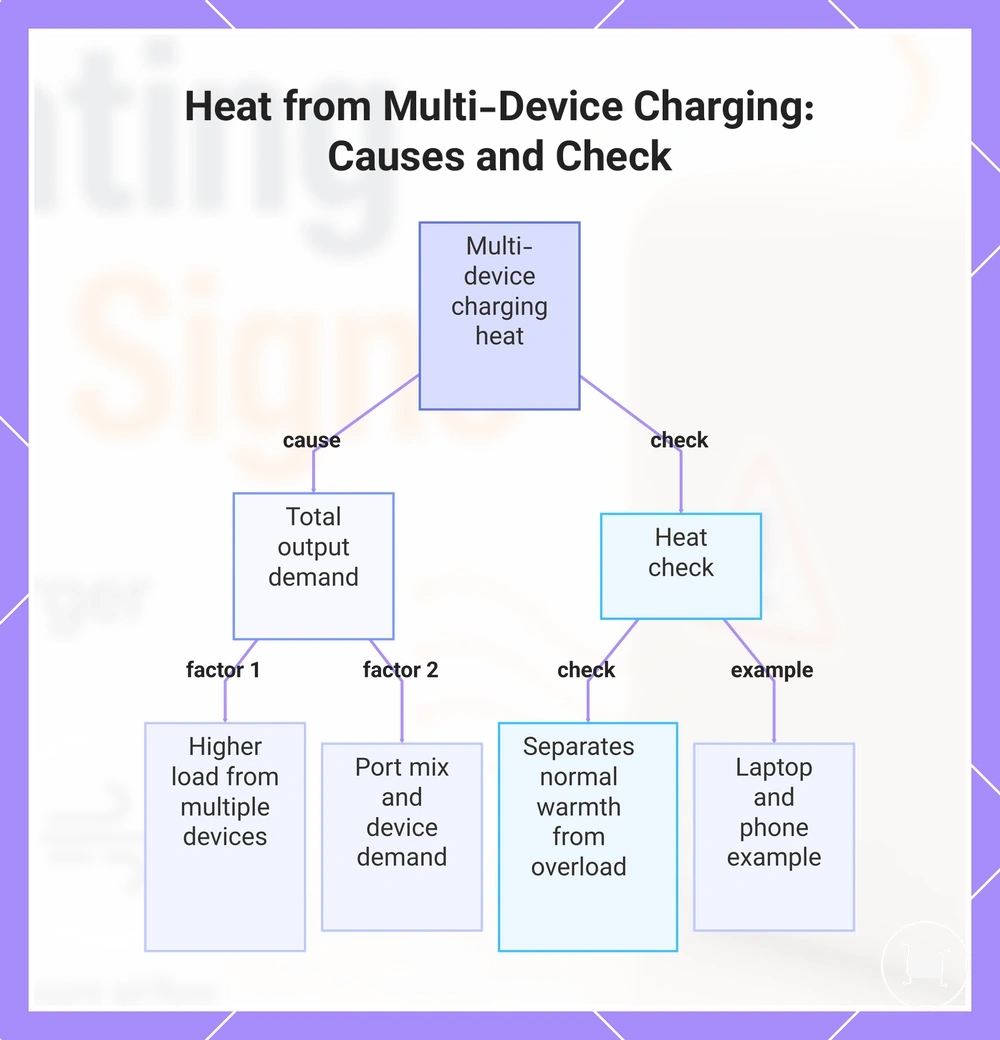
High wattage multi-device charging can raise heat by increasing total output demand. When multiple devices draw power at once, the charger load, port mix, and device demand can all affect how much heat the charger produces. The main condition is total load.
Power allocation becomes more important when a laptop, phone, or tablet draws from the same charger body through different ports. A high wattage and heat check helps separate normal higher-load warmth from a setup that may be asking too much from the charger at once.
A laptop and phone charging together can create more heat than one low-demand device because the charger has to divide shared output across the port mix. In that situation, power sharing under load is the example qualifier because device demand and total output can change during simultaneous charging.
This chart shows how high wattage multi-device charging increases heat and the check to separate normal warmth from excessive demand.
Cable, connector, or port resistance
A cable, connector, or port depends on secure contact points to transfer power with less resistance. A damaged cable, loose connection, poor fit, or worn contact point can increase resistance and create localized heat near the plug head, connector, charger port, or device port. When heat appears in one specific connection area rather than across the charger body, the pattern may point to localized resistance.
The checklist below verifies visible connection issues that can contribute to localized heat or charging interruption. A visible inspection can help identify external warning signs, but it has visible inspection limits.
- Check the cable jacket for splits, fraying, or other visible damage.
- Look for discoloration, deformation, or wear around the plug head or connector.
- Confirm that the connector fits securely without a loose connection.
- Inspect the charger port and device port for visible damage or abnormal wear.
- Note whether localized heat appears repeatedly at the same contact point.
- Watch for charging interruption that occurs when the cable or connector position changes.
Poor ventilation and trapped surface heat
When charger heat seems worse than expected, poor ventilation and trapped heat are often contributing conditions. A hard surface usually allows better heat dissipation than fabric or an enclosed space, while higher ambient temperature can slow heat release. Heat buildup may become more noticeable when airflow is limited, making airflow the key condition.
The checklist below diagnoses surface and spacing conditions that can affect heat dissipation and surface heat.
- Check whether the charger is resting on a hard surface rather than fabric.
- Look for an enclosed space or wall outlet position that may restrict airflow around the charger.
- Confirm that desk clutter is not blocking air circulation near the charger body.
- Consider whether high ambient temperature may be adding to overall warmth.
- Note whether charger warmth changes after improving spacing and airflow around the placement area.
If heat appears mainly in confined or covered locations, placement may be contributing to trapped heat. If the same charger feels cooler after gaining more open space, the difference may point toward placement correction.
Compact GaN charger heat concentration
A GaN charger can feel warmer because high output is concentrated within a compact body. When a smaller casing handles more power, power density increases and surface heat can become more noticeable during sustained high output use. This concentration of warmth is often related to compact power density.
A common assumption is that a warm GaN charger is either completely normal or defective by default. In practice, surface heat alone does not confirm either condition because thermal protection, operating load, and design quality can all influence how a compact body manages concentrated warmth.
Warning signs of unsafe charger heat
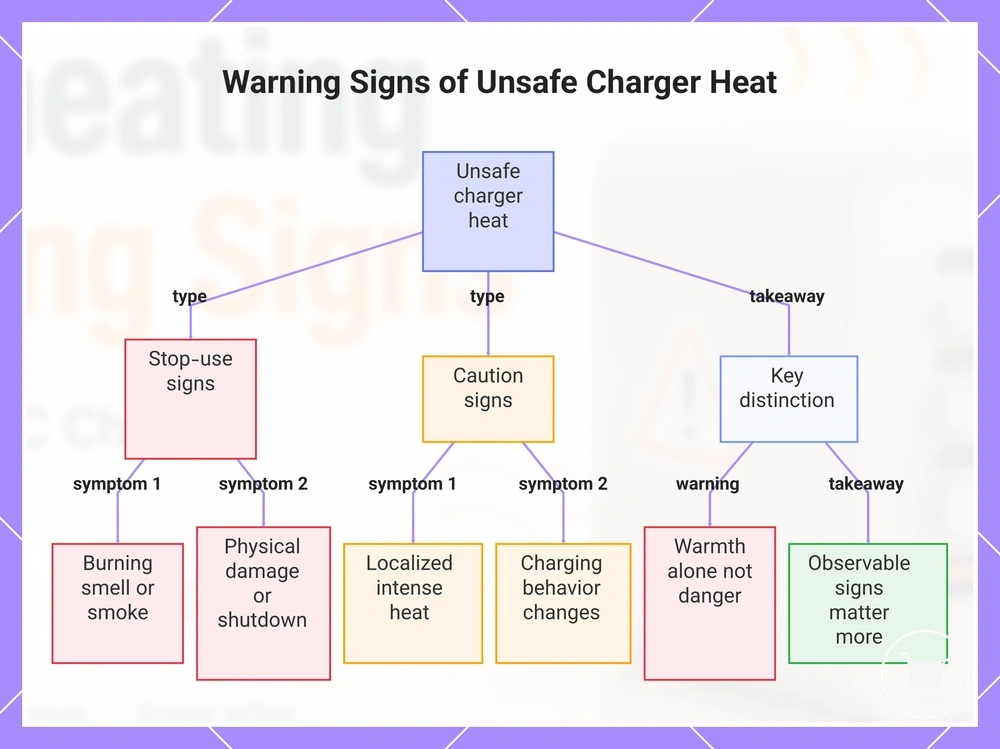
Warning signs make charger heat a safety concern when physical damage, unusual behavior, or sensory cues appear alongside excessive heat. A burning smell, smoke, softened plastic, warping, or repeated shutdown should be treated as a stop-use signal.
Unsafe charger heat is identified by warning signs rather than warmth alone. Observable changes in sound, appearance, or charging behavior carry more weight than subjective temperature impressions. The list below separates caution signs from stop-use signs.
- Burning smell coming from the charger body, plug area, or port area
- Buzzing or crackling sounds that appear during normal charging use
- Smoke or visible emissions from the charger, cable connection, or port
- Discoloration, softened plastic, or other signs of physical damage
- Warping, deformation, or separation of charger casing materials
- Repeated shutdown during charging, especially when excessive heat is present
- Localized heat near a plug area or port area that becomes noticeably more intense than surrounding surfaces
- Charging behavior changes that occur together with heat and other warning signs
A common misconception is that any warmth means danger. In practice, warning signs carry more significance than warmth alone, making observable damage or abnormal behavior the more important boundary.
This chart categorizes the warning signs of unsafe charger heat into stop-use signs, caution signs, and the key distinction between warmth and danger.
Burning smell, buzzing, discoloration, or case deformation
Burning smell, buzzing, discoloration, or case deformation are observable warning signs that can indicate unsafe heat or component stress. Unlike warmth alone, these physical and sensory changes provide visible or noticeable evidence that deserves attention. The presence of these signs can be treated as unsafe heat evidence.
The following physical and sensory signs are grouped because they can indicate external heat damage or abnormal operating conditions:
- Burning smell or unusual odor coming from the charger body, plug area, or port area
- Buzzing or other unusual noise that appears during charging activityCharging interruptions, throttling, or thermal shutdown
When charging interruptions, throttling, or thermal shutdown happen, heat-related protection or instability may be part of the pattern. Reduced output, stop-start charging, and cooldown recovery can indicate that charging behavior is changing in response to heat conditions. Repeated behavior changes are a meaningful heat clue.
Changed charging behavior can have different meanings depending on when it appears and whether it improves after cooling. The table below organizes behavior changes by likely meaning and the next condition to check.
Behavior Likely heat-related meaning What to check Throttling Power reduction that may occur when heat rises Charging load, device demand, and heat buildup Stop-start charging Charging pauses that may indicate heat-related instability under load Whether the pattern repeats during similar charging conditions Reduced output Lower charging performance that may accompany throttling Heat levels, connected devices, and overall load Device notifications Messages that may indicate charging or temperature-related conditions Whether notifications appear together with heat symptoms Thermal shutdown followed by cooldown recovery Protective response that may allow charging to resume after cooling Whether the behavior returns repeatedly under similar use Heat protection and thermal shutdown behavior
Heat protection and thermal shutdown behavior are protective responses designed to limit risk when charger temperature rises. Temperature monitoring can trigger power reduction, port throttling, or thermal shutdown when heat reaches a level that may affect normal operation. The purpose of these safety features is to reduce heat-related stress through a protective response.
Heat protection does not mean every overheating situation is harmless. heat protection features refer to temperature monitoring and heat-control mechanisms that can reduce output, throttle ports, or stop charging until cooldown occurs. The block below separates normal protection behavior from repeated shutdown patterns.
Behavior pattern Likely interpretation Single thermal shutdown followed by cooldown recovery May indicate a normal protective response to elevated temperature Temporary power reduction or port throttling during high load May indicate heat control designed to lower temperature Repeated shutdown under similar conditions May indicate a recurring heat-related issue that deserves caution Repeated shutdown after cooldown recovery May indicate a shutdown-loop concern rather than a one-time response If a charger cools down and then works normally again, the behavior may be consistent with thermal protection responding to temporary heat. If repeated shutdown continues after cooldown recovery, the pattern may point to a shutdown-loop concern and warrants further checking of load, airflow, cables, or connection conditions.
Immediate checks when a charger overheats
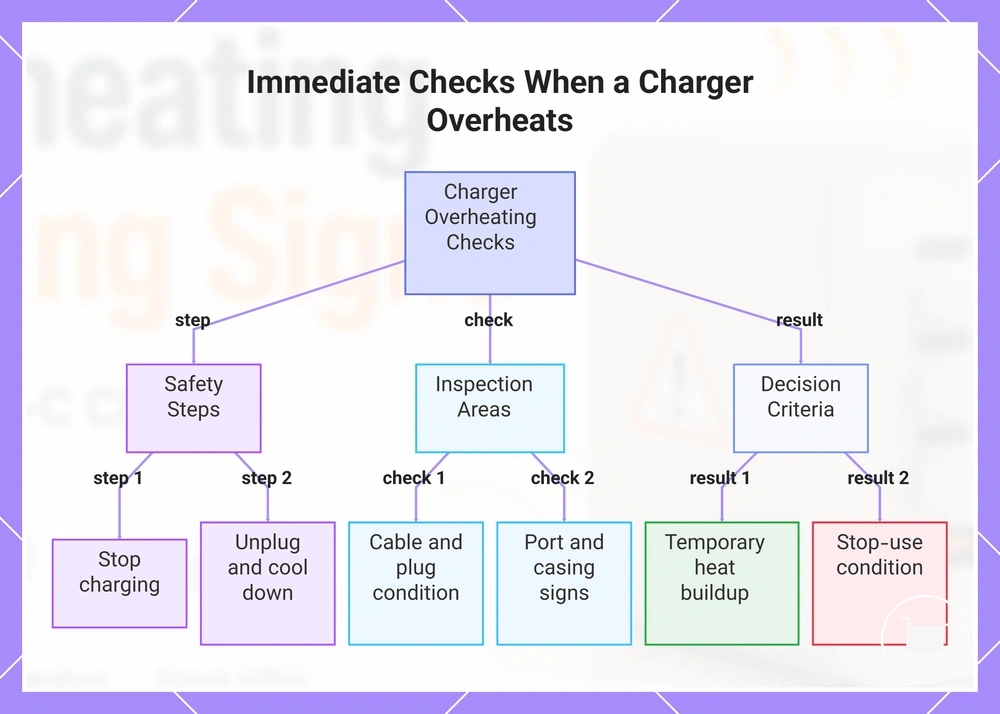
When a charger overheats, stop charging before trying to diagnose the cause. Unplug the charger and let it cool down on a clear hard surface before inspection.
The checklist below prioritizes safety before diagnosis. It starts with disconnecting power because inspection should not happen while the charger is hot or still charging.
- Unplug the charger from power and disconnect connected devices.
- Let the charger cool down on a clear hard surface with open airflow.
- Reduce load by removing extra devices before considering any later reuse.
- Inspect cable areas for visible damage, plug marks, looseness, or heat changes.
- Inspect port areas for discoloration, deformation, debris, or repeated charging interruption.
- Check for smell, casing changes, or visible damage before any further use.
If the charger cools down and no warning signs appear, the issue may have been temporary heat buildup from load or placement. If smell, visible damage, or repeated behavior appears, treat it as a stop-use condition.
These checks create the boundary for safe charger use before moving into longer-term prevention. Do not continue using a charger that repeats the same overheating pattern or shows damage.
This chart shows the safety-first steps, inspection areas, and outcome decisions for dealing with an overheating charger.
Unplugging, cooling, and reducing charging load
When a charger becomes too hot during use, unplugging is the first safe response. Disconnect power, remove connected devices, and allow the charger to cool down on a clear hard surface. This reduces immediate heat and exposure risk during cooldown.
The steps below reduce immediate heat and exposure risk before any further assessment.
- Disconnect power by unplugging the charger from the outlet.
- Place the charger on a clear hard surface and allow it to cool down naturally.
- Remove extra devices to support reducing charging load and lower heat demand.
- Check for warning signs such as unusual smell, visible damage, or casing changes.
- Retry only if warning signs are absent and repeated heat does not occur.
If repeated heat returns after cooling, stop using the charger and treat it as a warning condition. A retry condition exists only when warning signs, visible damage, and repeated heat are absent.
Inspecting cables, plugs, ports, and surfaces
Inspecting cables, plugs, ports, and surfaces starts after the charger has cooled down. A visible inspection can help identify external conditions that may contribute to heat or charging interruption, but it remains limited to visible, non-invasive checks.
The checklist below verifies visible, non-invasive conditions.
- Inspect cables for damaged cable insulation, cracks, wear, or other visible damage.
- Check plugs for a bent plug, scorch marks, discoloration, or damage at a contact point.
- Inspect ports for port debris and confirm that connector fit appears secure.
- Note whether port debris or a poor connector fit may be associated with charging interruption.
- Check for a loose outlet or visible damage around the outlet connection area.
- Inspect surfaces beneath the charger and consider whether the surface material may be trapping heat.
- Verify that surrounding airflow is not restricted by nearby objects or enclosed placement.
Visible damage, scorch marks, damaged cable insulation, a bent plug, or a loose outlet are stop-use or replacement signals. Avoid reusing visibly damaged parts and keep the inspection external and non-invasive.
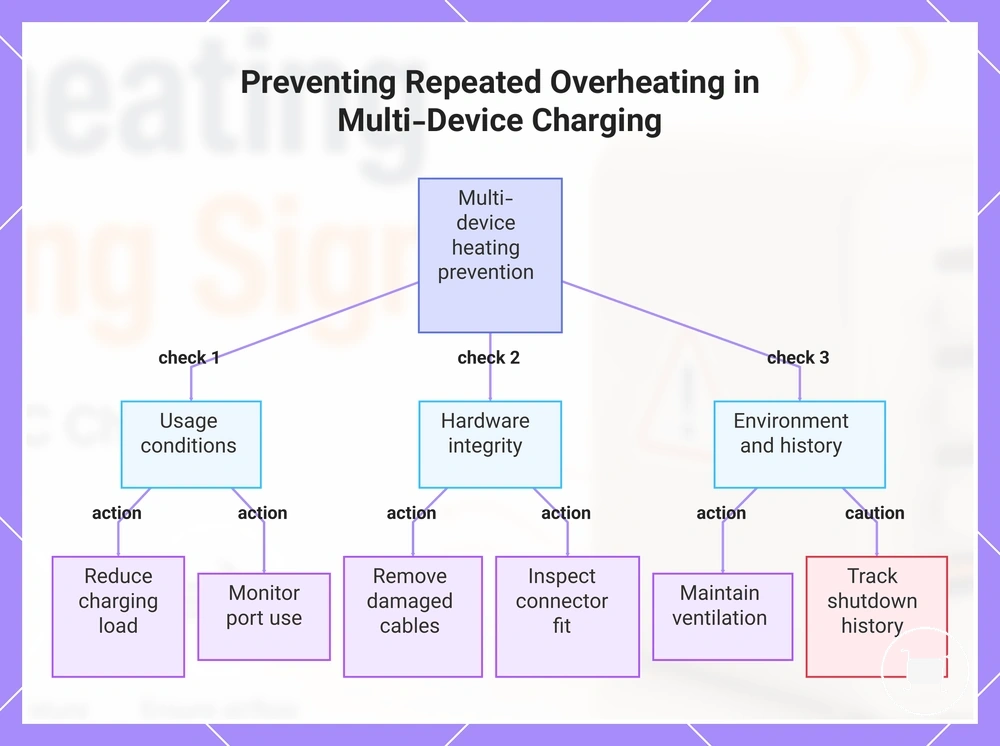
Preventing repeated overheating during multi-device charging
Preventing repeated overheating during multi-device charging depends on controlling the conditions that increase heat over time. Charging load, port use, cable condition, ventilation, ambient heat, and shutdown history are the main prevention variables. Ongoing load control and airflow management help organize these repeat-use conditions.
The checklist below organizes recurring heat conditions that may contribute to repeated heat patterns.
- Review the device mix and total wattage load during multi-device charging, especially during longer charging duration periods.
- Reduce charging load when repeated heat appears under the same port use pattern.
- Check cable condition and remove accessories that show visible damage, wear, or poor connector fit.
- Monitor port use because repeated use of the same connection pattern may contribute to heat-related issues.
- Maintain ventilation around the charger and avoid placement that restricts airflow management.
- Consider ambient heat because warmer surroundings may increase heat buildup during extended charging sessions.
- Track shutdown history and treat repeated shutdown events as a caution signal that may require a stop-use decision.
If repeated heat decreases after reducing charging load or improving ventilation, those conditions may be contributing to the heat outcome. When multiple conditions are present, adjust charging load or airflow first because they are often the most practical conditions to review.
This chart shows the main prevention variables and actions to check when repeated overheating occurs during multi-device charging.
When overheating means the charger should not be used again
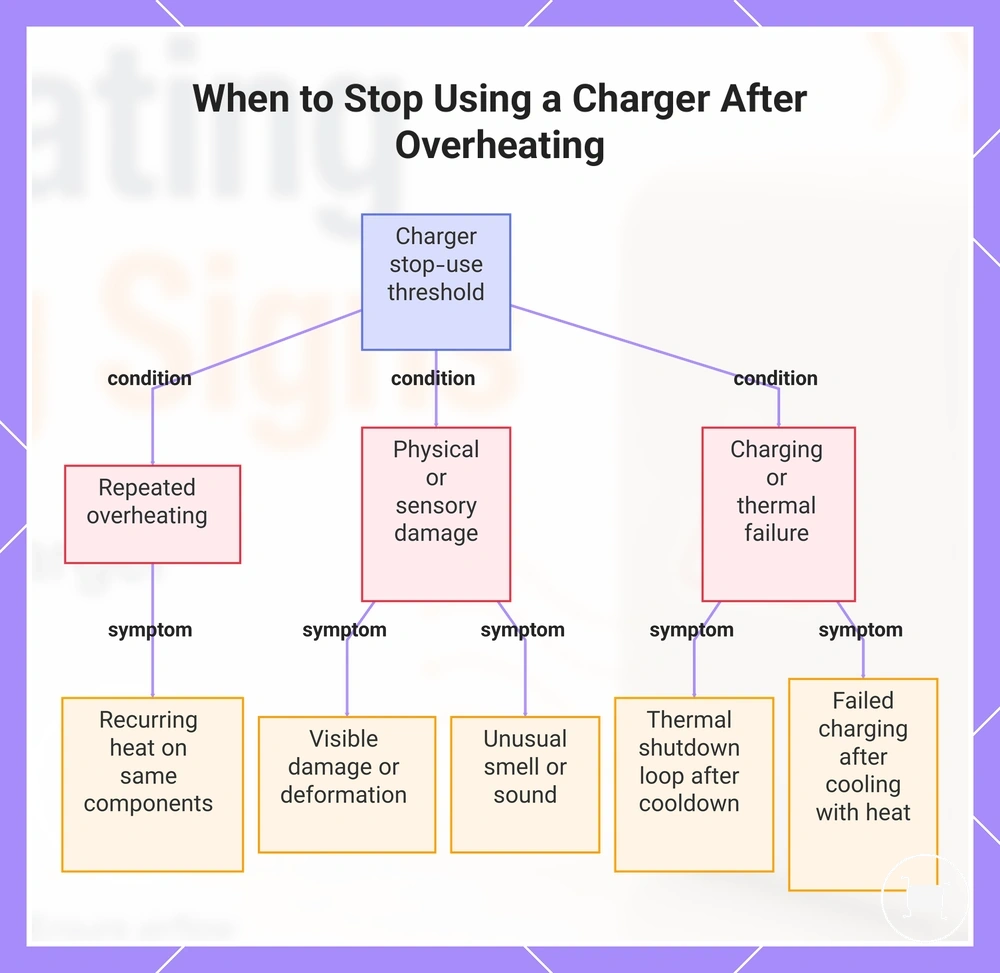
A charger should not be used again when overheating repeats or appears with damage, smell, sound, melting, or unstable charging behavior. These signs move the issue beyond cooldown-and-monitor and into the stop-use threshold.
Repeated overheating is more concerning when the same charger, cable head, plug, or port shows a recurring heat pattern. Physical damage, plug marks, unusual smell, unusual sound, or failed charging after cooling provide visible or behavior-based evidence.
The checklist below separates cooldown-and-monitor cases from stop-use cases.
- Stop using the charger if repeated overheating happens under similar charging conditions.
- Stop using the charger if physical damage, melting, deformation, or plug marks are visible.
- Stop using the charger if smell or sound appears during charging or shortly after heating.
- Stop using the charger if a thermal shutdown loop returns after cooldown.
- Stop using the charger if failed charging after cooling occurs with heat-related symptoms.
- Stop using the charger if the fault cause remains uncertain after a heat event.
If the charger cools and works again without warning signs, monitoring may be reasonable, but uncertainty after cooling should be treated carefully. Use charging failure troubleshooting only after unsafe reuse conditions are excluded, especially when failed charging after cooling becomes the boundary.
This chart shows the key warning signs that indicate a charger should not be reused after an overheating event.