
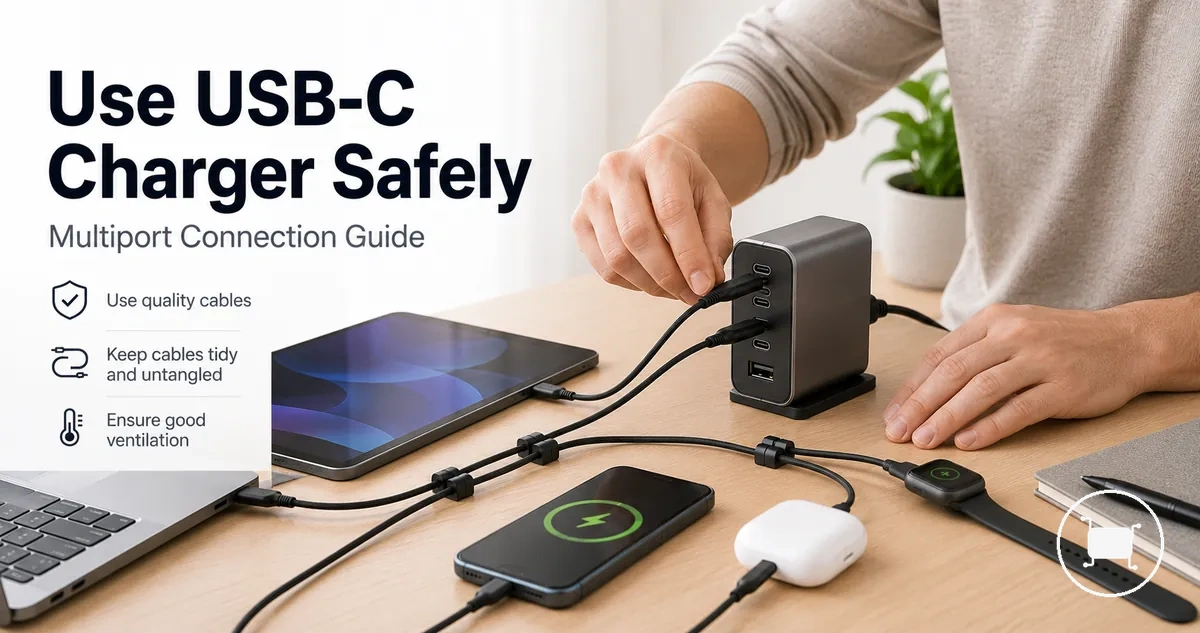
Safe Use of a Multiport USB-C Charger
Safe use of a multiport USB-C charger depends on charger condition, cable rating, connected device load, ventilation, and warning-sign awareness. A charger may be suitable for everyday multi-device charging when the equipment is intact, the connected devices fit the charger’s intended use, and the setup allows heat to dissipate.
A multiport USB-C charger should be treated as a condition-based charging system, not as a power source for every device mix. The charger model, port behavior, cable capability, and device requirements can change how safely and consistently power is delivered during use.
Safe charging habits can reduce avoidable risk, especially when cables are undamaged, connectors fit cleanly, surfaces stay dry, and the charger is not covered while working. These habits do not replace manufacturer guidance or checks for damaged equipment.
Visible damage, unusual heat, unstable charging, wetness, odour, or abnormal noise should change the user’s action before more devices are connected. In those cases, continued use may increase risk, and the charger, cable, outlet, or device condition should become the safety boundary.
For broader buying and selection context, the multiport USB-C charger hub separates safe-use guidance from charger comparison, wattage, cable, and troubleshooting topics.
What Makes Multiport USB-C Charging Safe or Risky
Safe charging conditions and risky charging conditions are determined by charger condition, cable condition, device load, airflow, and the charging environment. Safe charging conditions usually involve normal power negotiation, intended port sharing behaviour, intact equipment, and adequate ventilation, while risky charging conditions often involve damage, moisture, blocked airflow, or charging behaviour that changes unexpectedly.
Safe or risky charging conditions can change as connected devices and charging demands change. Charger certification, cable condition, charger condition, and airflow remain key factors when assessing whether a multiport USB-C charger is operating under suitable conditions.
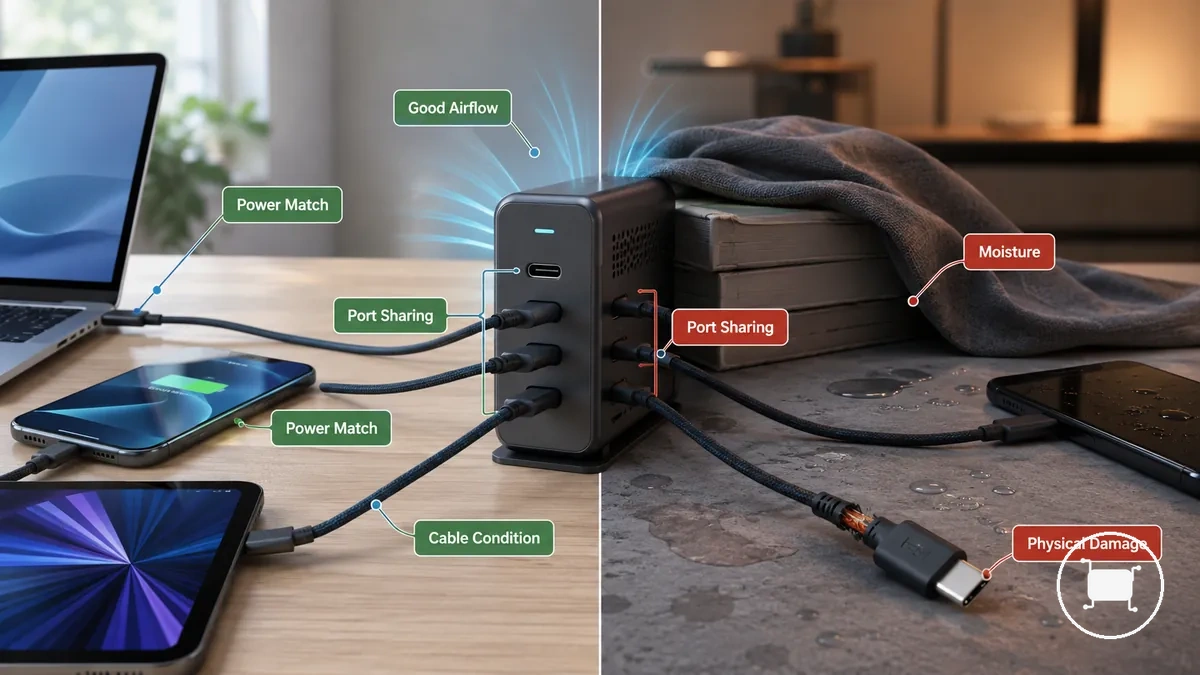
| Safer Condition | Risk Condition |
|---|---|
| Charger certification and manufacturer guidance are available and followed. | Charger condition, origin, or safety status is uncertain. |
| Power negotiation occurs as intended between the charger and connected devices. | Charging behaviour becomes inconsistent or devices reconnect unexpectedly. |
| Port sharing operates within the charger's intended behaviour. | Load changes may affect charging consistency across ports. |
| Cables are intact, connectors fit properly, and insulation shows no visible damage. | Cables show wear, loose connections, exposed conductors, or physical damage. |
| Ventilation is unobstructed and the charging area remains dry. | Airflow is blocked, moisture is present, or physical damage is visible. |
Heat during charging can be normal, but its significance often depends on charger condition, device load, ventilation, and environment. A multiport USB-C charger used with intact equipment and clear airflow may behave differently from a charger exposed to moisture, damaged cables, blocked ventilation, or visible physical damage, which can indicate higher-risk charging conditions.
USB-C Power Negotiation and Device Damage Risk
USB-C power negotiation is a communication process designed to match charger output with device demand while depending on compatible equipment and normal operating conditions. USB-C power negotiation helps coordinate charging behaviour between the charger and connected device, but device damage risk can still depend on charger condition, cable rating, port limits, and equipment condition.
USB-C power negotiation depends on charger output, device-requested power, cable rating, and supported charging protocols. Power Delivery features can help compatible equipment determine an appropriate charging profile, but charging outcomes may vary when cables are damaged, accessories are unsuitable, port limits are reached, or equipment is not operating as intended.
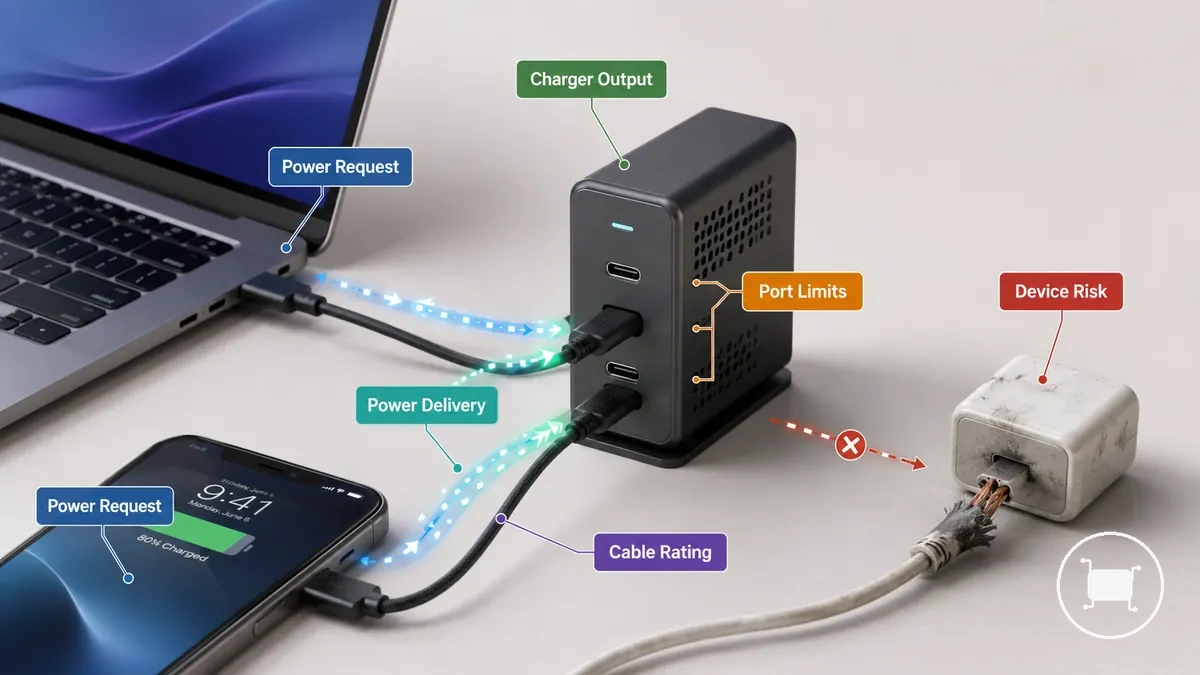
USB-C power negotiation differs from charging through damaged or unsuitable accessories because negotiated charging relies on communication between compatible equipment. For example, two devices connected to the same multiport charger may request different power levels, yet charging behaviour can still depend on available charger output, cable rating, port limits, and the condition of the connected equipment.
Safety Features Still Depend on Correct Use
Safety features can help reduce common charging risks, but they do not override correct use conditions. Built-in protections support normal charging conditions, yet their effectiveness can still depend on cable quality, ventilation, equipment condition, and how the charger is used.
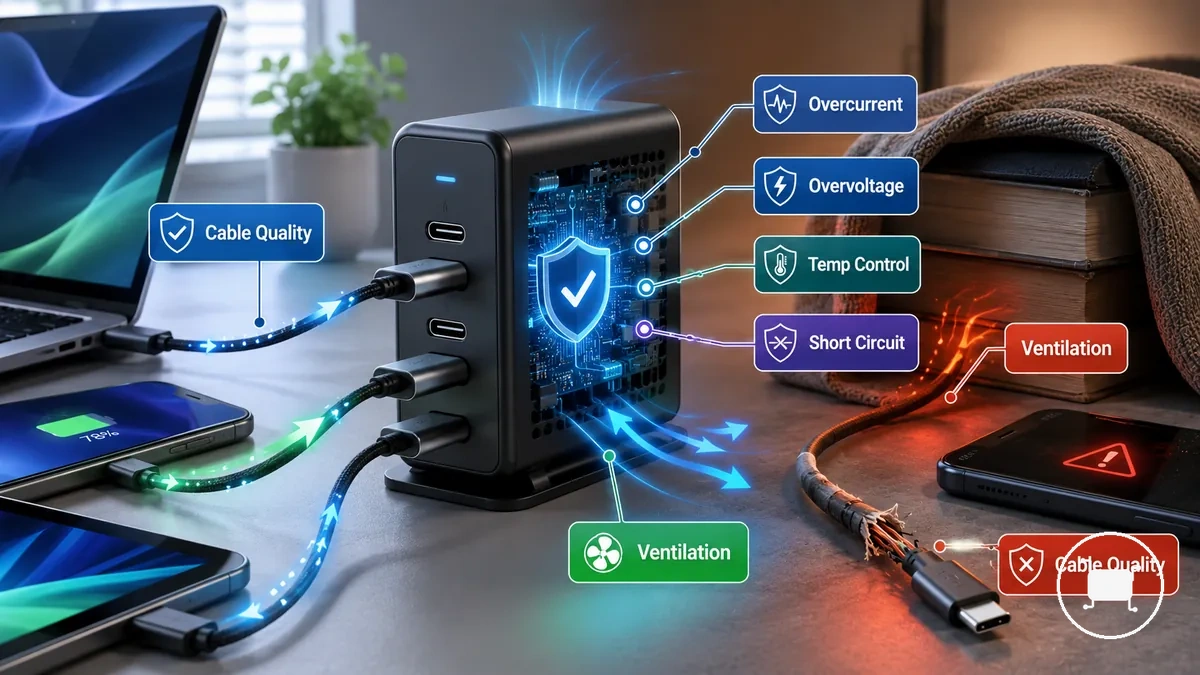
- Overcurrent protection: Can help respond to unexpected current conditions, but protection outcomes may vary with equipment condition.
- Overvoltage protection: Can help manage charging conditions, but unsuitable or damaged equipment may still increase risk.
- Temperature control: Can help address changing heat conditions, but blocked ventilation can limit normal operation.
- Short-circuit protection: Can help reduce certain fault-related risks, but visible damage should not be treated as normal use.
- Cable quality: Suitable cables support intended charging behaviour, while damaged cables may affect charging conditions.
Built-in protections should be viewed as supportive safeguards rather than guarantees. More detailed information about charger safety features may help explain how protection systems are intended to operate, but protections cannot compensate for a damaged charger, blocked airflow, liquid exposure, or unsuitable cables. Equipment that is damaged, wet, or operating with obstructed ventilation should not be treated as normal charging conditions.
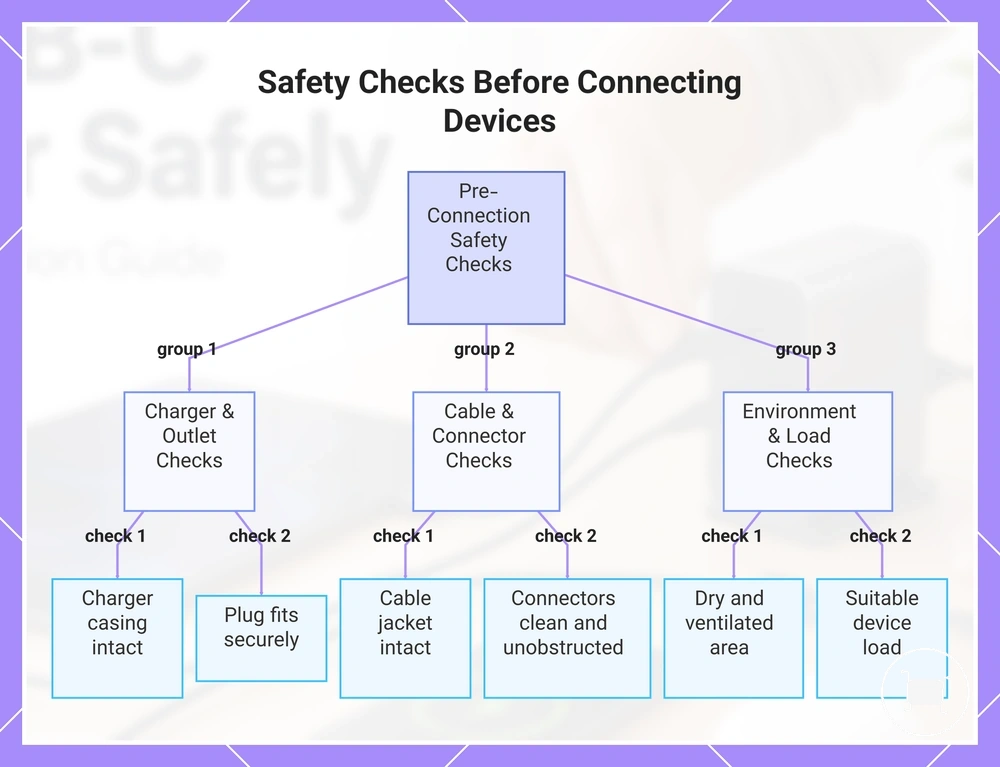
Safety Checks Before Connecting Devices
Safety checks before connecting devices help verify that the charger, cables, outlet, and charging area are suitable for use. A quick inspection can reduce avoidable risks by identifying visible problems before multiple devices begin drawing power.
Before connecting devices, verify these pass-or-stop conditions. If a check fails because of visible damage, a loose connection, or a wet charging area, the setup should not be treated as ready for normal use.
- Charger casing: Pass if the charger body is intact. Stop if the casing is cracked, broken, or visibly damaged.
- Plug fit and outlet stability: Pass if the plug fits securely and the outlet connection feels stable. Stop if the connection is loose or unstable.
- Cable jacket: Pass if the cable insulation is intact. Stop if exposed wires, splits, or significant wear are visible.
- Connector cleanliness: Pass if charging connectors appear clean and unobstructed. Stop if debris, contamination, or visible damage is present.
- Dry surface: Pass if the charger and surrounding area are dry. Stop if moisture or liquid exposure is present.
- Airflow: Pass if ventilation around the charger is unobstructed. Stop if airflow is blocked by nearby objects.
- Number of devices: Pass if the device load appears suitable for the charging setup. Charging behaviour may vary as more devices are connected.
- High-power load: Pass if higher-power devices are connected under suitable conditions. Load suitability can depend on the charger, cables, and connected devices.
These checks apply whether the charger is used at a desk, at home, while travelling, or beside a bed. The environment may change, but charger condition, cable condition, dry surfaces, secure connections, and airflow remain useful checks before connecting multiple devices.
This chart groups the safety checks into three categories and shows the pass-or-stop conditions for each.
Inspect the Charger, Cable, and Outlet
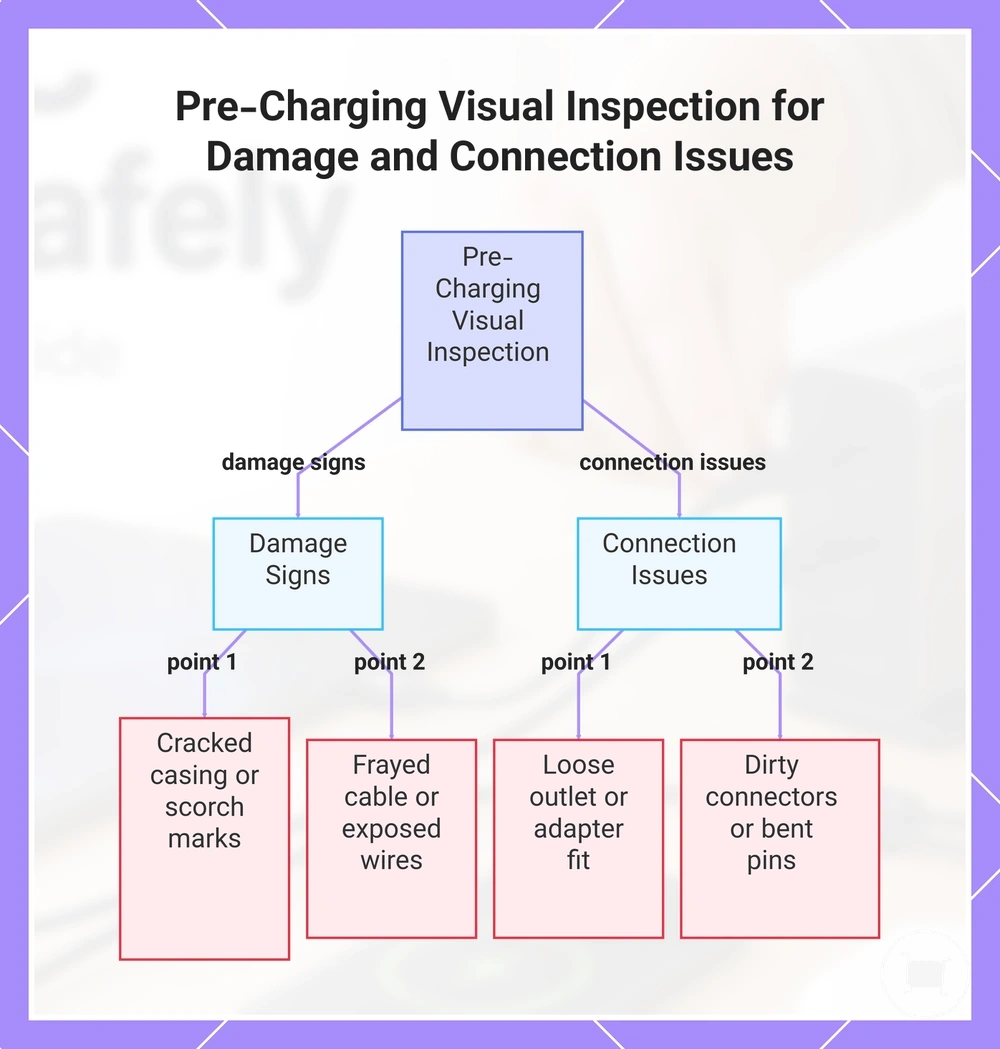
Inspect the charger, cable, and outlet for visible damage before charging begins. Focus on component condition rather than charging performance, and treat clear signs of damage as stop-use indicators.
- Charger: A cracked casing can expose internal components and should be treated as a stop-use condition.
- Charger plug: Bent pins can affect connection quality and may increase charging-related risk.
- Outlet: A loose outlet fit can create an unstable connection and should not be treated as normal operation.
- Cable: A frayed cable jacket or exposed wires require the affected cable to be removed from use.
- Charger or cable: Scorch marks can indicate prior overheating or damage and should be treated as a stop-use cue.
- Connector: Dirty connectors can interfere with normal charging behaviour and should be inspected before connecting devices.
- Adapter: An unstable adapter connection can interrupt charging and may indicate that the setup is not secure.
Visible charger, cable, and outlet conditions are often easier to verify than charging behaviour. When damage, loose connections, or clear wear are present, the affected item should not be treated as ready for normal charging use.
This chart shows the key visual checks to perform on charger, cable, and outlet before charging, focusing on damage signs and connection stability.
Keep Liquids, Bedding, and Heat Sources Away
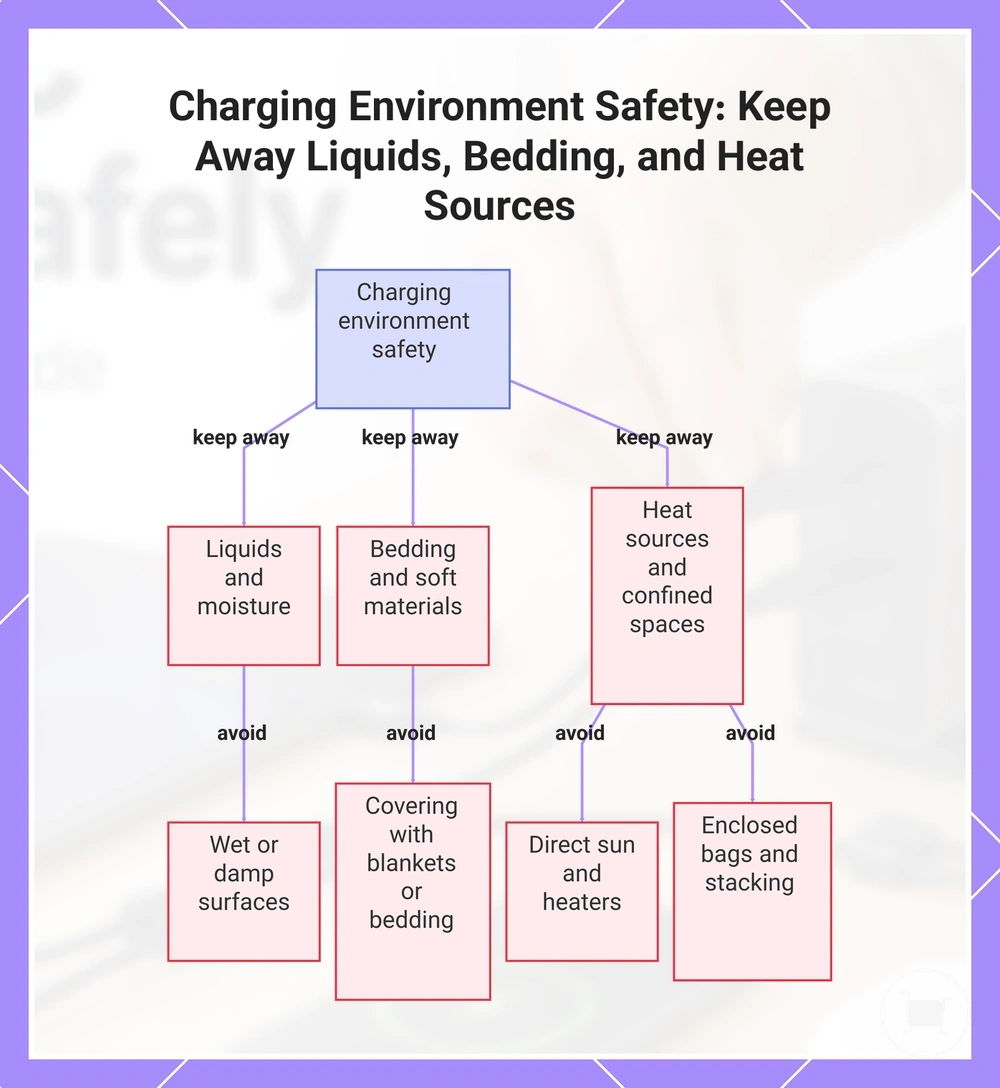
The charging environment should be checked before charging begins because nearby surfaces and surrounding objects can affect contact risk and airflow. Liquids, soft materials, and nearby heat sources are environmental conditions that should be removed before connecting devices.
A dry, open charging area is usually easier to monitor than a space where moisture, heat, or airflow restrictions are present. Environmental conditions can vary by surface, airflow, charger load, and charging duration.
- Do not place a charger on wet or damp surfaces before charging.
- Do not cover a charger with bedding, blankets, or similar soft materials that can restrict airflow.
- Do not place a charger on rugs or other heat-trapping surfaces during charging.
- Do not leave a charger in direct sun or near heaters while charging.
- Do not charge devices inside enclosed bags or confined spaces that can limit airflow.
- Do not stack devices directly on top of a charger during charging.
This chart shows the three main categories of environmental hazards to remove from the charging area to prevent contact risk and airflow restrictions.
Match Wattage, Cable Rating, and Device Load
Safe charging depends on matching charger output capacity, cable rating, and device load rather than evaluating any single component in isolation. Charger total wattage, single-port output, cable rating, and the combined demand of connected devices can all influence charging behaviour.
The table below organizes charger, cable, and device-load conditions into a simple matching framework. Each condition helps identify whether the charging setup may require fewer connected devices, a higher-rated cable, or a different device arrangement.
| Entity or Part | Attribute or Criterion | Value or Condition | Effect or Decision |
|---|---|---|---|
| Charger | Total wattage | Combined device demand approaches available output | Charging behaviour may vary as more devices are connected |
| Charger | Single-port output | High-power device depends on substantial output from one port | Charging the device alone may be more suitable in some cases |
| Cable | Cable rating | Cable rating matches charger output capacity and device demand | Charging conditions are more likely to remain consistent |
| Cable | E-marker relevance | Higher-capability charging setup depends on cable features | Cable suitability should be verified before use |
| Device Load | Shared-output limits | Multiple devices draw power from the same charger | Available output may be distributed across active ports |
Charger output capacity, cable rating, and device load should be evaluated together rather than separately. More information about safe wattage limits can help clarify how charger output and device demand relate under different charging conditions.
Labeled charger and cable ratings should be respected, and a damaged cable should be removed from use. When charging performance becomes inconsistent, the decision may depend on the charger model, cable rating, and device mix. Reducing the number of connected devices, using a higher-rated cable, or charging a high-power device on its own may help align charger output capacity with device demand.
Use Rated Cables for Higher-Power Charging
Rated cables matter when higher-power charging depends on the cable supporting charger output capacity and device demand. Higher-power charging can depend on cable wattage rating, USB-C to USB-C compatibility, cable condition, and the charging requirements of the connected device.
Rated cables should be matched to the intended charging setup, especially for laptop charging and other higher-demand devices. More information about safe USB-C cable use can help clarify how cable ratings and device requirements relate under different charging conditions.
- Check cable wattage rating: Cable capability may vary, so the rating should align with the charging setup.
- Use USB-C to USB-C where required: Higher-power charging may depend on the cable type supported by the charger and device.
- Verify e-marker relevance: Certain higher-capability charging setups may depend on cable features such as an e-marker.
- Assess laptop charging needs: Laptop charging can require closer attention to cable rating and device demand.
- Avoid damaged connectors: A cable with visible connector damage should not be used for charging.
- Monitor cable heat: Unusual cable heat can indicate that the charging setup should be inspected before continued use.
Treat Shared Port Output as a Charging Limit
Shared port output is a charging limit because active ports draw from the charger’s available output. Total wattage is limited, so the output available to each device may change as additional devices are connected and device demand changes.
A laptop, phone, and accessory connected to the same multiport charger may not receive the same charging behaviour throughout a charging session. More detail about power sharing during use can help explain how active ports may redistribute available output when device demand changes. Depending on the charger model, port priority and dynamic redistribution may affect how output is allocated across connected devices.
Shared port output can influence charging speed and heat under load when multiple devices are active at the same time. Exact distribution depends on charger design, device demand, and active-port behaviour, so slower charging or changing output allocation may occur as the connected device mix changes.
Safe Multi-Device Charging Habits
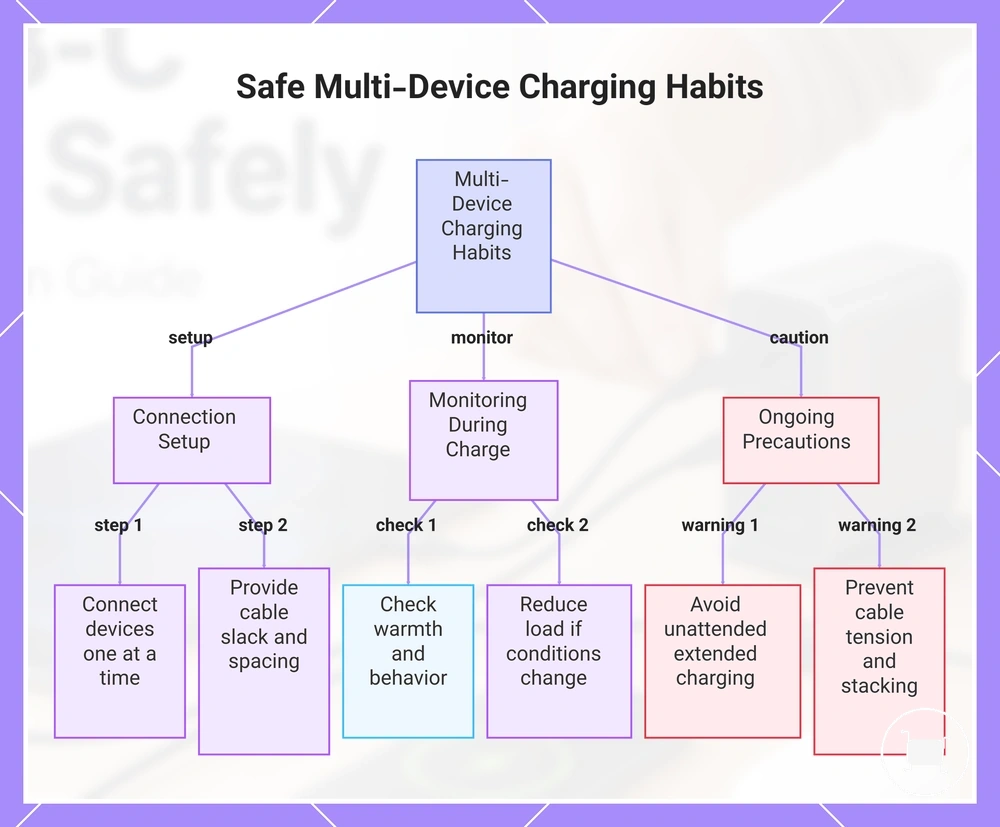
Multi-device charging starts with a consistent connection pattern that reduces cable strain, limits port stress, and makes charging behaviour easier to monitor. Active charging conditions can change as devices are added, removed, or begin drawing different amounts of power.
Use these steps during everyday charging when multiple devices share one charger:
- Connect the charger and position devices before connecting charging cables.
- Connect devices one at a time so charging behaviour can be observed as each device becomes active.
- Route cables with enough slack to avoid pulling on connectors and creating unnecessary port stress.
- Maintain space between devices to support airflow and reduce contact between charging devices.
- Perform occasional warmth checks during longer charging sessions and watch for unexpected changes in charging behaviour.
- Reduce load by disconnecting non-essential devices if charging conditions change or charging performance becomes inconsistent.
Multi-device charging habits continue after devices are connected. Conditions that may require additional attention include:
- Leaving multiple devices charging unattended for extended periods may require closer consideration because device demand and charging conditions can change over time.
- Avoid placing tension on cables by moving connected devices carefully while charging is in progress.
- Keep devices separated rather than stacked directly together when warmth under load becomes noticeable.
- Reduce the number of connected devices if charging behaviour changes unexpectedly during a charging session.
These multi-device charging habits help maintain more predictable everyday charging conditions by focusing on connection order, cable routing, port stress, device spacing, warmth checks, and load management while charging is active.
This chart shows the recommended steps and precautions for charging multiple devices from a single charger.
Connect and Remove Devices Without Stressing Ports
Connecting and removing devices without stressing ports starts with careful handling of connectors and cables. Straight insertion, controlled removal, and reduced cable strain can help limit unnecessary stress on ports and connectors during everyday charging.
- Insert connectors straight into ports because angled insertion can place unnecessary stress on the connector and port.
- Remove connectors by gripping the connector body because pulling by the cord can strain the cable-to-connector connection.
- Avoid sharp cable bending near connectors because repeated bending can increase stress at the connection point.
- Support heavier cables when possible because cable weight can place additional load on ports and connectors.
- Check for loose ports if connectors no longer feel secure because port movement may require closer assessment before continued use.
- Reduce strain on a wall-mounted charger by avoiding cable tension that pulls downward or sideways on connected ports.
Avoid Unattended Charging in Risky Conditions
Unattended charging becomes less safe when equipment condition, charging load, or the charging environment introduces additional risk. Routine charging may be suitable in many cases, but damaged, wet, or overheating equipment should not be left unattended.
Before leaving devices charging without supervision, check whether any of these risky conditions are present:
- Damaged gear, including damaged chargers, connectors, or cables, is connected.
- Heat buildup becomes noticeable during charging or charging behaviour changes unexpectedly.
- Covered chargers may have restricted airflow during charging.
- Charging takes place in wet areas or where moisture is present.
- Unstable outlets create a loose or inconsistent connection.
- An unfamiliar charger is being used and its condition or behaviour cannot be readily assessed.
- High-power multi-device loads or charging in bags may create conditions that are harder to monitor.
Unattended charging should be reconsidered when these risky conditions are present. Correcting equipment or environment issues first may help create more suitable charging conditions before devices are left unattended.
Heat and Ventilation During Charging
Heat and ventilation during charging affect how a multiport USB-C charger operates under different load and environmental conditions. Charger warmth may occur during normal use, while heat buildup can become more noticeable when airflow is restricted, ambient temperature is higher, the charger is enclosed, or multiple devices draw power at the same time.
The table below separates normal warmth, caution signs, and stop-use signs to help distinguish expected operating conditions from heat-related warning signals.
| Condition | What It May Mean | Safer Response |
|---|---|---|
| Normal charger warmth | May reflect routine charging activity under current load and environmental conditions | Maintain adequate airflow and continue monitoring during use |
| Blocked vents, enclosure use, or high combined load | May increase heat buildup and reduce effective ventilation | Restore airflow and reassess charging conditions |
| Noticeable smell, discoloration, or unexpected shutoff behavior | May indicate a condition requiring immediate attention | Stop using the charger until the condition is assessed |
Heat and airflow should be considered together because ambient temperature, surface material, and enclosure conditions can influence how effectively heat dissipates. A charger used on an open, stable surface may retain less heat than the same charger operating in a confined space or under a higher combined load.
Expected operating warmth differs from excessive heat because warning signs may appear alongside temperature changes. Smell, discoloration, repeated shutoff behavior, or persistent heat despite unobstructed airflow are stronger indicators that charging conditions should be reviewed rather than treated as routine charger warmth.
Keep the Charger Clear While It Is Working
Keeping the charger clear while it is working depends on maintaining airflow and clearance around the charger so heat can dissipate during use. Heat buildup may become more noticeable when airflow is restricted, particularly as load, surface conditions, or ambient temperature change.
Charger placement should prioritize open surfaces and unobstructed airflow rather than allowing surrounding items to trap heat around the charger body.
- Place the charger on an open surface where airflow can circulate around it.
- Keep clear space around the charger and leave the charger uncovered during operation.
- Do not leave covered outlets or covered charger areas that can trap heat.
- Keep pillows, papers, and similar items away from the charger while it is working.
- Reduce cable tangles around the charger because bundled cables may restrict airflow and trap heat.
- Check that charger placement remains unobstructed as devices and cables are moved during use.
Separate Normal Warmth From Unsafe Heat
When a multiport USB-C charger feels warm during use, normal warmth can occur under charging load, especially when multiple devices are connected. Unsafe heat needs caution when warmth is accompanied by smell, discoloration, pain to touch, unusual noise, malfunction, or repeated shutdowns.
The comparison below helps distinguish normal warmth from warning signs by focusing on observable charging conditions rather than exact temperature levels.
| Normal Warmth | Unsafe Heat or Stop-Use Signal |
|---|---|
| Warm during active charging under device load | Pain to touch during normal handling |
| Warmth varies with ventilation and connected devices | Noticeable smell, discoloration, or visible marks |
| Charging continues without unusual behaviour | Repeated shutdowns, malfunction, or unusual noise |
| Cable warmth remains consistent with charging conditions | Cable heat becomes unusually noticeable or changes unexpectedly |
Normal warmth and unsafe heat should be judged together with ventilation, charging duration, and device load. When local checks indicate that heat is accompanied by warning signs rather than routine warmth, review common charger overheating signs before continuing to use the charger.
When to Stop Using the Charger
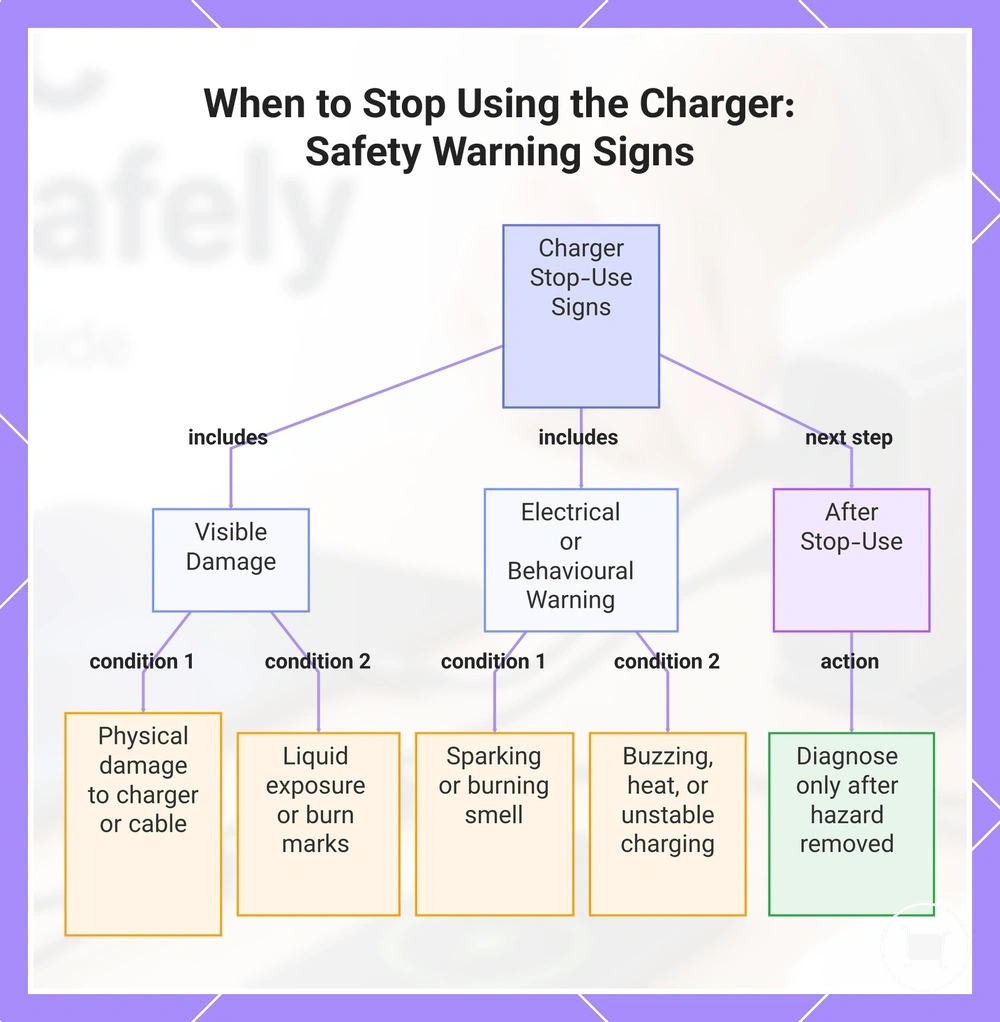
Stop using the charger when visible damage, liquid exposure, burning smell, abnormal noise, excessive heat, sparking, or unstable charging appears. Disconnect the charger when it is safe to do so, and do not treat the same setup as normal charging behaviour.
The checklist below separates stop-use conditions from routine charging behaviour. These signs do not prove the exact cause of the fault, but they are strong enough to pause use before more devices are connected.
- Wetness or liquid exposure: Stop using the charger if the charger, cable, outlet area, or connected device is wet or has been exposed to liquid.
- Cracked casing or bent plug: Disconnect the charger if the casing is cracked, the plug is bent, or the charger body looks physically damaged.
- Scorch marks or discoloration: Stop using the affected charger, plug, outlet, or cable if burn marks or unusual discoloration are visible.
- Cable damage: Remove the cable from use if the jacket is split, wires are exposed, or the connector is damaged.
- Repeated dropouts or unstable charging: Pause use if devices repeatedly disconnect, reconnect, or charge unpredictably.
- Sparking, burning smell, or odour: Disconnect the charger when it is safe to do so if sparking, burning smell, or unusual odour appears.
- Buzzing or abnormal noise: Stop using the charger if unusual buzzing, crackling, or other abnormal noise occurs during charging.
- Excessive heat: Stop use if the charger or cable becomes unusually hot, especially when heat appears with other warning signs.
After the immediate stop-use step, causes may still depend on the charger, cable, outlet, device, and charging load. Use charging problem checks only after the unsafe condition has been removed from normal use.
This chart shows the main stop-use conditions for a charger and the recommended next step after removing the hazard.
Disconnect After Wetness, Damage, Odour, Noise, or Excessive Heat
Disconnect the charger immediately when wetness, visible damage, burning odour, unusual buzzing or crackling, excessive heat, scorch marks, or repeated charging interruption is present. These warning signs are stop-use conditions and should be treated as reasons to separate the charging setup before further use.
- Disconnect the charger from power when it is safe to do so.
- Separate the charger, cable, and connected devices so each item can be checked individually.
- Stop using the setup if wetness, visible damage, scorch marks, burning odour, buzzing, crackling, or excessive heat is present.
- Remove any damaged equipment from normal charging use rather than reconnecting or testing it under load.
- Keep the charger disconnected if repeated charging interruption continues alongside other warning signs.
- Replace damaged equipment or consider professional assessment when the condition or severity of the damage is unclear.